Evaluating Floral Corners for Digital Crafting Projects
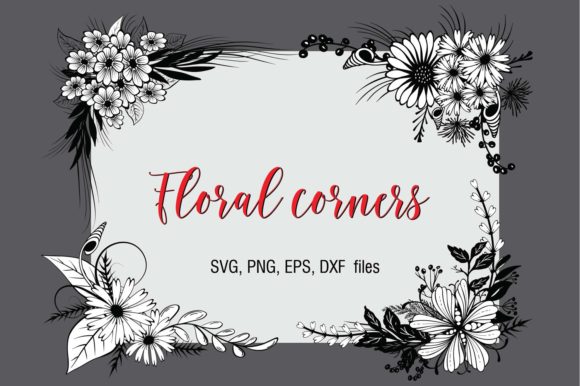
Floral corners serve as versatile decorative elements in digital design and physical crafting, providing structured botanical aesthetics to frame content or embellish products. When evaluating a specific collection, such as a Set of 6 Floral Corners, it is essential to understand both the artistic utility and the technical specifications required for successful execution. These assets are designed primarily for users of cutting machines like Cricut and Silhouette, as well as those engaged in sublimation and print-on-demand projects. Understanding the intersection of file compatibility, design versatility, and project requirements allows crafters to determine if this specific asset set aligns with their production goals.
Defining the Asset and Its Utility
A floral corner is distinct from a full border or a standalone flower illustration. It is specifically engineered to occupy the negative space of a rectangular or square canvas, creating a frame without enclosing the entire design. This set provides six unique variations, offering enough diversity to maintain visual interest across a product line while ensuring stylistic consistency. For makers using Cricut, Silhouette, or similar cutting machines, these graphics function as foundational layers. They can be cut from vinyl, cardstock, or iron-on material, or they can serve as registration guides for print-then-cut workflows. In sublimation, they act as high-resolution anchors that define the composition of mugs, tumblers, and apparel.
Technical Specifications and Compatibility
The viability of any digital craft asset depends entirely on file format compatibility with the user’s hardware and software ecosystem. This collection includes five distinct file types, each serving a specific technical purpose. Evaluating which files you will actually utilize is a critical step before acquisition.
- SVG Files: These are the industry standard for vector-based cutting machines. SVGs allow for infinite resizing without quality loss and separate color layers for multi-color cuts. They are natively supported by Cricut Design Space and the paid version of Silhouette Studio.
- DXF Files: This format is crucial for users operating the free basic version of Silhouette Studio, which does not support SVG imports. DXF files preserve vector paths but may occasionally lose layer grouping upon import, requiring manual reorganization.
- PNG with Transparent Fill: High-quality 300dpi images with black outlines and transparent interiors. These are optimized for sublimation and print-then-cut projects where the background must remain invisible.
- PNG with White Fill: Also 300dpi with black outlines, but featuring a solid white interior. This variation is necessary when printing on dark substrates or when a solid base layer is required to prevent background bleed-through in sublimation.
- EPS Vector File: A professional-grade format containing all assets. This is intended for users working in Adobe Illustrator, CorelDRAW, or Affinity Designer who wish to modify the vector nodes, recolor individual elements, or integrate the corners into complex commercial designs.
Before proceeding, verify that your specific machine firmware and software version support at least one of these formats. While most modern setups handle SVG and PNG seamlessly, older machines or legacy software versions may require conversion tools.
Benefits and Practical Applications
The primary benefit of utilizing pre-designed floral corners is workflow efficiency. Creating balanced, symmetrical botanical frames from scratch requires significant time and design skill. A curated set of six ensures that the stroke weights, floral density, and overall style remain cohesive. This consistency is particularly valuable for creators selling physical goods or digital templates, as it establishes a recognizable brand aesthetic.
From a production standpoint, the inclusion of both transparent and white-fill PNGs addresses common pain points in sublimation. Transparent fills allow for seamless blending with colored backgrounds, while white fills provide necessary opacity for darker materials. Furthermore, the availability of DXF files democratizes access for hobbyists who have not invested in premium cutting software, reducing the barrier to entry for new crafters.
Tradeoffs and Considerations
While versatile, floral corners present specific limitations that must be weighed against project needs. The most significant consideration is aspect ratio. Corners are inherently designed for right angles. If your project involves circular items like plates or curved surfaces like tapered tumblers, these assets may require substantial manipulation or may not fit organically. Distorting a vector corner to fit a curve can result in uneven line weights and distorted petal shapes.
Additionally, reliance on pre-made sets limits exclusivity. Because these files are available to multiple users, there is a possibility of design overlap within niche markets. Crafters aiming for completely unique branding may need to use these corners as a base layer, adding custom text, monograms, or additional illustrations to differentiate their final products. Users should also consider the complexity of the cut lines. Intricate floral details can be challenging for blade cutting on delicate papers or fibrous vinyl. Testing cut settings on scrap material is always recommended before committing to expensive substrates.
Situational Fit and Alternatives
This Set of 6 Floral Corners is a strong fit for specific scenarios. It is ideal for scrapbooking, card making, wedding stationery, and framing quotes or photographs. Makers producing seasonal decor, gift tags, or planner stickers will find the scale and style highly applicable. The dual PNG options make it particularly suitable for mixed-media creators who switch between vinyl cutting and dye-sublimation printing.
However, alternatives may be worth considering in different contexts. If your work focuses exclusively on large-format signage or wall decals, corner pieces may be too small or detailed; full borders or large-scale floral clusters would offer better visibility and faster weeding times. Conversely, if you require minimalist or geometric aesthetics, traditional botanical corners may feel overly ornate. For those needing editable source files to change the species of flowers or adjust the curvature, a clipart bundle without an EPS file would be insufficient, necessitating a search for fully layered vector originals.
Making an Informed Decision
Selecting digital craft assets requires balancing creative vision with technical reality. When evaluating this floral corner set, assess your current inventory of designs. Do you lack framing elements? Does your audience respond well to botanical themes? Most importantly, confirm your technical capacity to utilize the provided files. The presence of SVG, DXF, PNG, and EPS formats covers the vast majority of crafting ecosystems, but individual setups vary.
Consider the long-term value of the set. Six coordinated designs offer more longevity than a single image, allowing for series creation and product variation. Weigh the cost against the hours saved in design time and the potential revenue from finished goods. By objectively analyzing file compatibility, application suitability, and design flexibility, you can determine whether these floral corners will enhance your crafting repertoire or if a different asset type better serves your specific production requirements.